Upstream Servers
MCPProxy can connect to multiple MCP servers simultaneously, providing unified access through a single endpoint.
Server Types
MCPProxy supports three types of upstream connections:
stdio Servers
Local servers that communicate via standard input/output:
{
  "name": "filesystem",
  "command": "npx",
  "args": ["-y", "@modelcontextprotocol/server-filesystem", "/home/user/projects"],
  "protocol": "stdio",
  "enabled": true
}
HTTP Servers
Remote servers accessible via HTTP/HTTPS:
{
  "name": "remote-server",
  "url": "https://api.example.com/mcp",
  "protocol": "http",
  "enabled": true
}
OAuth Servers
Servers requiring OAuth 2.1 authentication:
{
  "name": "github-server",
  "url": "https://api.github.com/mcp",
  "protocol": "http",
  "oauth": {
    "client_id": "your-client-id",
    "scopes": ["repo", "user"]
  },
  "enabled": true
}
Configuration Options
| Option | Type | Required | Description |
|---|---|---|---|
name | string | Yes | Unique identifier for the server |
command | string | For stdio | Command to execute |
args | array | No | Command arguments |
url | string | For HTTP | Server URL |
protocol | string | Yes | stdio or http |
enabled | boolean | No | Whether server is active (default: true) |
working_dir | string | No | Working directory for stdio servers |
env | object | No | Environment variables to pass |
oauth | object | No | OAuth configuration |
Headers, Environment Variables, and Secrets
Both HTTP headers and stdio env are first-class config fields you can
inspect and edit from the Web UI, the macOS tray, the CLI, and the REST
API. The wire format and semantics are identical across surfaces.
How the API displays them
The REST API (GET /api/v1/servers), the SSE servers.changed event, and
the MCP upstream_servers list tool all redact sensitive header values
by default. The mask format is:
••••<last2> (<N> chars)
…e.g. a 71-character Bearer token whose last two characters are 59
appears on the wire as ••••59 (71 chars). The mask preserves enough
context to identify which token is in use without leaking the secret.
Values that are already secret references — ${keyring:NAME} or
${env:VAR} — pass through unchanged: they're labels, not secrets.
This redaction was added in PR #425 to close a real exfiltration path —
a prompt-injected agent calling upstream_servers list would otherwise
get back another upstream's Bearer token in plaintext.
To disable redaction (for debugging only), set reveal_secret_headers: true
in mcp_config.json. It's not normally needed: the editing flow
described below works without ever exposing the plaintext to the client.
How you edit them
Web UI / macOS tray
The Server Detail page → Configuration tab has dedicated Headers and Environment Variables cards with per-row affordances:

- Add —
+ Add header/+ Add variablebutton at the top. - Edit — pencil icon turns the value cell into an input. Save / Cancel.
- Delete — trash icon. Confirms first.
- Convert to secret — lock icon. Opens a modal asking for a name,
then atomically moves the value into the OS keyring and replaces the
config field with
${keyring:NAME}.
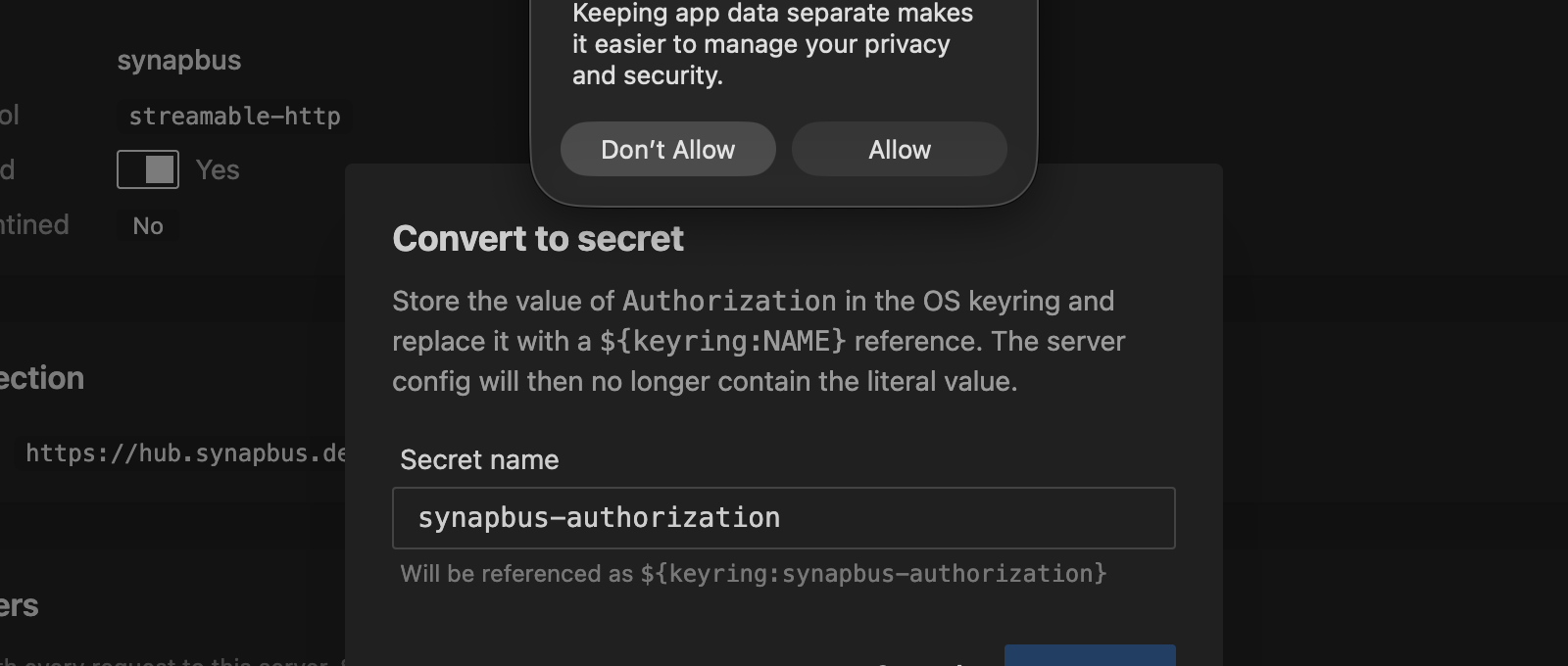
The Convert flow works even on masked headers: the backend has the real
value in mcp_config.json and never needs the client to send it.
${keyring:…} references render as a labeled chip instead of a masked
literal, so converted headers are visually distinct.
CLI
# Upsert one or more headers
mcpproxy upstream patch synapbus --header "X-Trace: on"

# Rotate Authorization in place
mcpproxy upstream patch synapbus --header "Authorization: Bearer new-token"

# Delete one
mcpproxy upstream patch synapbus --header-remove "X-Stale"

# Mix set + delete in a single round-trip
mcpproxy upstream patch synapbus --header "X-New: v" --header-remove "X-Old"

# Env vars (stdio servers)
mcpproxy upstream patch obsidian-pilot --env "LOG_LEVEL=debug"
mcpproxy upstream patch obsidian-pilot --env-remove "OBSOLETE"
See Management Commands for the full flag reference.
REST API
PATCH /api/v1/servers/{name} follows JSON Merge Patch
(RFC 7396):
curl -X PATCH -H "X-API-Key: $KEY" -H "Content-Type: application/json" \
  -d '{"headers":{"X-New":"value","X-Stale":null}}' \
  http://127.0.0.1:8080/api/v1/servers/synapbus
- non-null string value → upsert
- JSON
nullvalue → delete - key absent from body → preserve (this is how the UI sends a diff against the masked view without overwriting unchanged values)
See REST API › PATCH for the
full reference, including the
/config-to-secret
endpoint that backs the "Convert to secret" affordance.
Secret references
headers and env values support two reference shapes that get resolved
at request time rather than stored in plaintext:
| Reference | Source | Lifetime |
|---|---|---|
${keyring:NAME} | OS keyring entry called NAME | Persists across restarts; managed via the Secrets page or mcpproxy secrets CLI |
${env:VAR} | The VAR environment variable on the mcpproxy process | Tied to the shell/launcher that started mcpproxy |
When mcpproxy connects to an upstream it substitutes the reference with the actual secret. The reference itself never reaches the upstream MCP server. See Keyring Integration for the full secret-storage story.
Docker Isolation
For enhanced security, stdio servers can run in Docker containers:
{
  "name": "isolated-server",
  "command": "npx",
  "args": ["-y", "some-mcp-server"],
  "protocol": "stdio",
  "isolation": {
    "enabled": true,
    "image": "node:20",
    "network_mode": "bridge"
  }
}
Note: Memory and CPU limits are configured at the global level in docker_isolation, not per-server.
See Docker Isolation for complete documentation.
Process Lifecycle
Startup
When MCPProxy starts, it:
- Loads server configurations from
mcp_config.json - Creates MCP clients for each enabled, non-quarantined server
- Connects to servers in the background (async)
- Indexes tools once connections are established
Shutdown
When MCPProxy stops, it performs graceful shutdown of all subprocesses:
- Graceful Close (10s): Close MCP connection, wait for process to exit
- Force Kill (9s): If still running, SIGTERM → poll → SIGKILL
Process groups: Child processes (spawned by npm/npx/uvx) are placed in a process group, ensuring all related processes are terminated together.
See Shutdown Behavior for detailed documentation.
Quarantine System
New servers added via AI clients are automatically quarantined for security review. See Security Quarantine for details.